
AI Week in Review for November 16 to 20 2026
The most useful question in artificial intelligence this week is what happens after the answer appears on the screen.
Can the system finish the assignment? Can someone verify the result? Does the work improve enough to justify the time and money involved?
Those questions connect a busy week of developments. OpenAI and Google introduced models aimed at demanding professional work. Google expanded computer interaction on the Mac. Microsoft announced tools for measuring AI spending and results, while AWS expanded the engineers it places alongside customers to help implement AI. OpenAI [1] Google [2] Google [3] Microsoft [4] AWS [5]
For professionals navigating a job search, a promotion, or a career change, the implications deserve attention. Our reading of this week is that useful AI capability increasingly involves defining an assignment, supplying the right information, checking the work, and taking responsibility for the outcome. Knowing the name of the latest model tells an employer very little about those abilities.
This review covers selected developments announced or published from November 16 through November 20, 2026. Product capabilities below are attributed to the companies announcing them. The workplace studies report survey responses, with their populations and limitations kept separate.
The week at a glance
Development: OpenAI introduced GPT-6.2 Astra and Sol; Google introduced Gemini 4 Neon OpenAI release notes [6] Google [2] Date: November 17 and 18 Career question: Can you define and evaluate a useful professional deliverable?
Development: Google announced computer use in the Gemini app for Mac Google [3] Date: November 19 Career question: Which repetitive tasks could you responsibly delegate?
Development: Microsoft detailed Agent 365 updates; AWS expanded embedded engineering Microsoft [4] AWS [5] Date: November 17 Career question: Can you help turn a working demonstration into a dependable process?
Development: Northeastern published research on uneven time savings Northeastern [7] Date: November 18 Career question: What improvement can you demonstrate in your own work?
Development: Adecco and Seramount published workforce findings Adecco [8] Seramount [9] Date: November 19 Career question: Are training and expectations keeping pace with the tools?
Development: NVIDIA reported quarterly results; Anthropic announced its IPO closing NVIDIA [10] Anthropic [11] Date: November 17 and 20 Career question: Where does your experience fit in the wider AI economy?
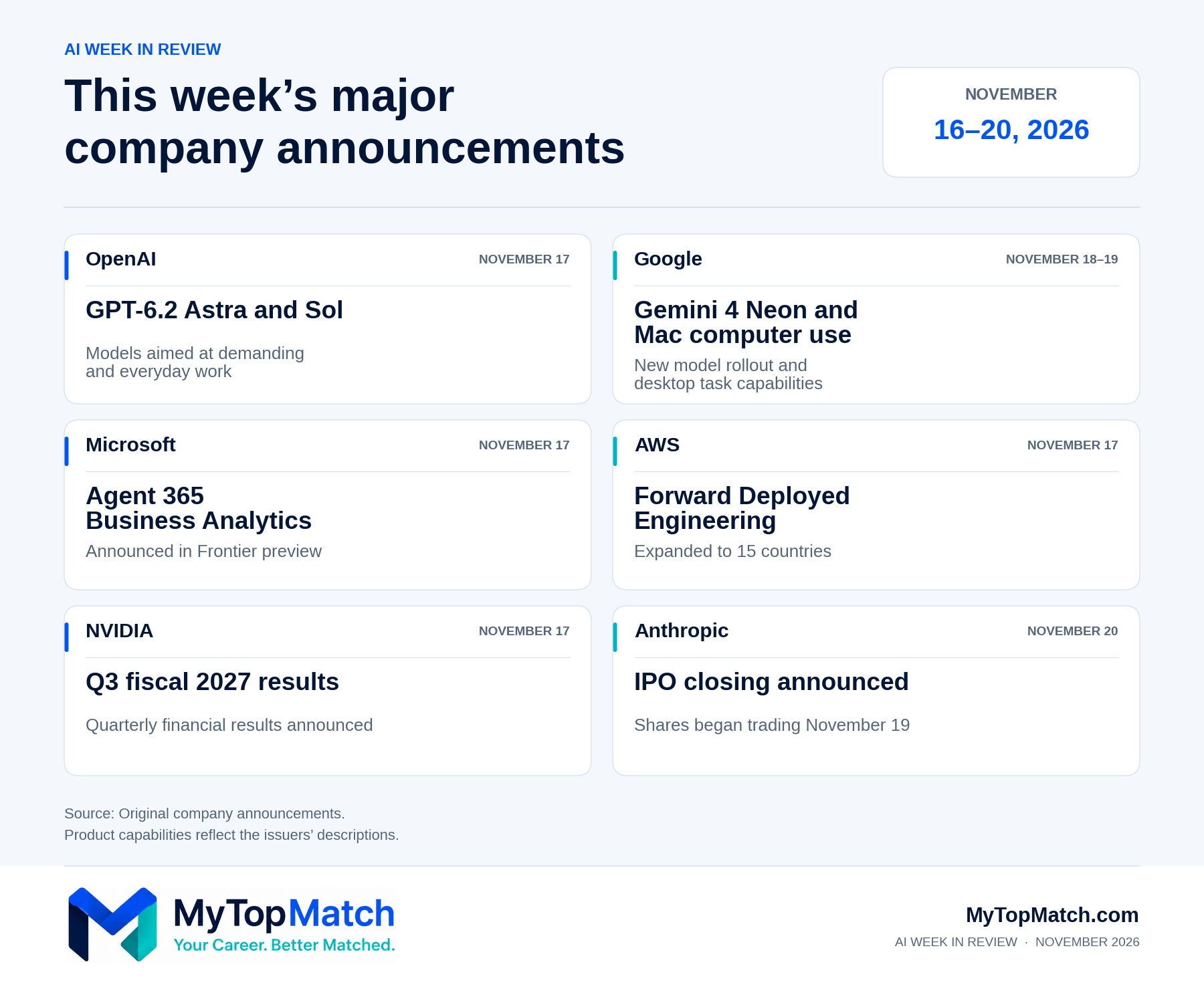
Selected company announcements from November 16 through November 20, 2026. Product availability and preview conditions vary.
New models target the work professionals actually produce
OpenAI introduced GPT-6.2 Astra and GPT-6.2 Sol on November 17. It positions Astra for demanding professional assignments and Sol for everyday work requiring speed and efficiency. The launch emphasizes documents, spreadsheets, presentations, software development, and tasks involving multiple steps. OpenAI reports improvements in its evaluations; those results describe tested conditions and should not be read as a guarantee for a particular employer's assignments. OpenAI [1] OpenAI release notes [6]
Google followed on November 18 with Gemini 4 Neon. Its announcement similarly emphasizes software engineering, analytical work, and the ability to work across materials such as spreadsheets, PDFs, charts, and other media. Google began rolling it out through specified developer, business, and paid consumer offerings. Its benchmark claims remain claims about those evaluations, rather than evidence that every company will obtain equivalent results. Google [2]
The shared direction matters more to a career strategy than a leaderboard position. Both announcements place recognizable professional deliverables at the center of their pitch.
Consider a financial analyst preparing a management report. A useful assignment requires the right reporting period, definitions for each measure, reconciled figures, and an explanation of meaningful changes. A sales leader preparing an account plan must connect customer information to a realistic recommendation. A polished document still needs someone who understands what would make it accurate and useful.
For your career: Prepare to explain how you set those standards. If you have used AI on a professional assignment, describe the inputs, the checks, the corrections, and your contribution to the finished work. Keep claims within what you actually did and can substantiate.
Google brings computer tasks into the delegation conversation
On November 19, Google announced computer use in the Gemini app for Mac. The company says the feature can work across local files, desktop applications, and websites in an isolated background window. Examples include transferring information from PDFs into shipping forms and collecting dashboard information for a presentation. Users choose application access, can view progress and pause work, and approve key actions. Google [3]
The rollout has limits. Google's announcement specifies English in the United States, eligible paid personal accounts for adults, and Apple Silicon Macs running macOS Sequoia 15.0 or later. This is an announced capability with defined access requirements. Its performance on a reader's own tasks remains untested. Google [3]
For your career: A useful exercise is to separate a recurring assignment into routine handling and decisions that require your expertise. An operations coordinator might distinguish copying shipment details from resolving conflicting delivery requirements. That separation makes it easier to explain where automation could help and where accountable judgment remains necessary.
Microsoft and AWS focus on making AI useful inside a business
At Ignite on November 17, Microsoft announced Agent 365 Business Analytics in Frontier preview. The company describes a way to connect AI usage and spending with measures such as assisted hours, success rates, and satisfaction. It also detailed expanded agent identities, management, and risk controls, with availability varying across capabilities and connected platforms. Microsoft [4]
The management question is straightforward: what useful work did the organization receive for the resources it committed?
For a manager, a credible answer requires more than counting activity. A weekly report could arrive sooner while containing errors that take longer to repair. A support process could handle more cases while mishandling exceptions. Evaluation should include the full result and the effort required to achieve it.
AWS addressed another part of implementation on November 17, announcing that its Forward Deployed Engineering service was available in 15 countries. The service places engineers alongside customers to help put AI into operation. AWS identifies obstacles such as messy business data, operational controls, and important rules that remain in employees' heads. The program began in June; this week's development was its geographic expansion. AWS [5]
An experienced employee who can explain how a process really works has something useful to contribute. That may include why certain cases require escalation, which source record is authoritative, or what makes an apparently reasonable recommendation unacceptable.
For your career: Document that knowledge. A clear procedure, a set of representative exceptions, or a record of how you resolved a recurring problem can demonstrate implementation value. Operations leaders, analysts, project managers, and specialists can use these examples to show how their experience supports a technology initiative.
Reported time savings remain uneven
A Northeastern University report published November 18 found that 33% of workers used AI at least monthly and reported saving at least one hour a week. A smaller group, 9% of workers, reported saving eight or more hours weekly and accounted for more than half of the reported hours saved. Northeastern [7]
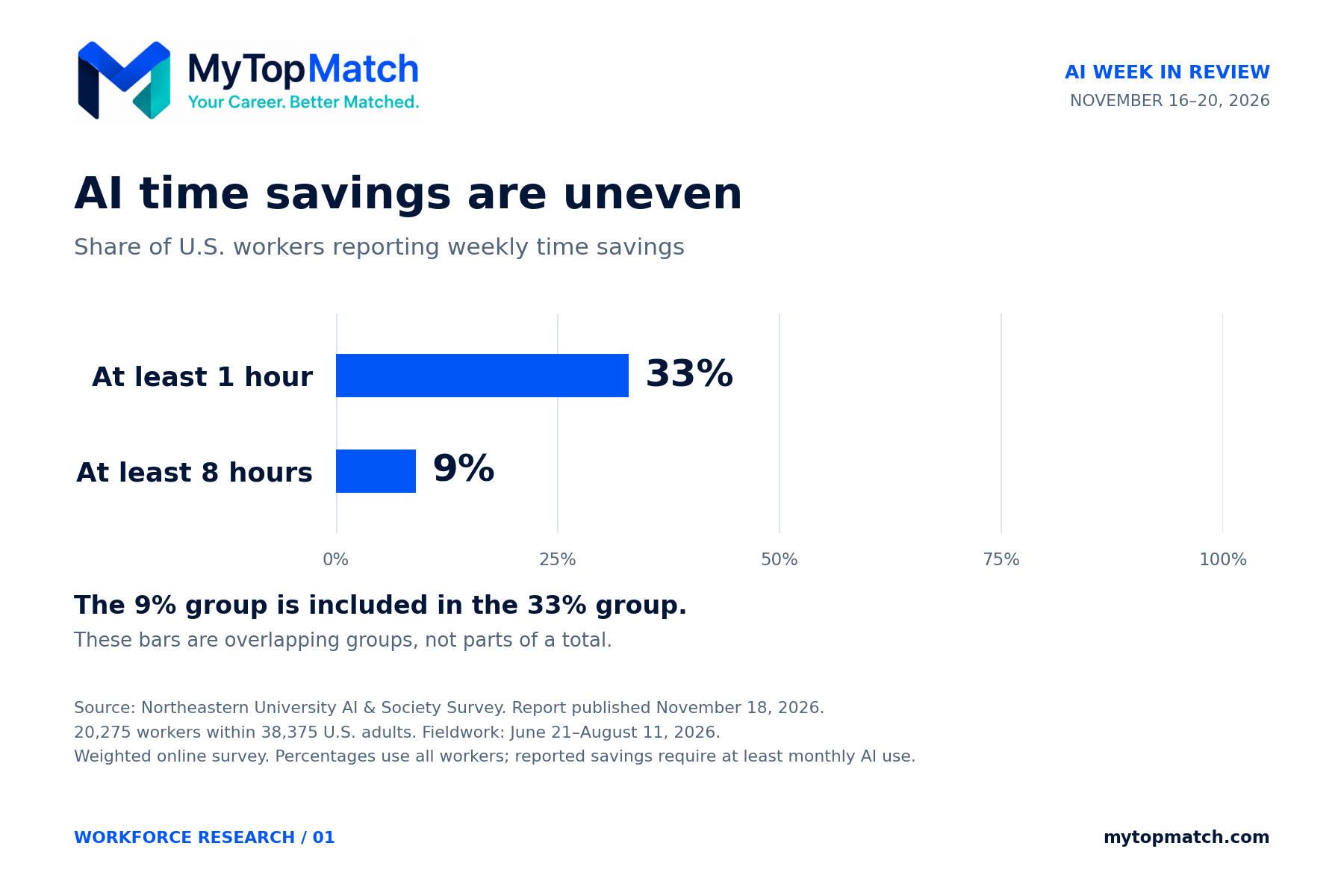
Self-reported weekly time savings were concentrated among a subset of workers. The two thresholds overlap and must not be added.
The report draws on a survey of 38,375 U.S. adults, including a worker population of 20,275, fielded from June 21 through August 11, 2026. These are self-reported time savings from a weighted online survey, rather than direct measurements of each participant's output. They describe summer experiences reported in research published this week. Northeastern [7]
For your career: Build your own evidence. Record how long a recurring assignment takes, including review and corrections. Then compare a carefully controlled AI-assisted attempt using the same quality standard. A modest, documented improvement gives you a more defensible story than borrowing somebody else's productivity percentage.
Training and work design deserve as much attention as adoption
Adecco's November 19 Global Workforce of the Future release draws on an online survey of 40,500 workers across 36 countries and 21 industries, conducted in June and July. Workers describing AI as well integrated into their workflows reported saving 20% more time per day than those reporting lower integration. That is a relative difference in reported time saved, not a universal 20% increase in productivity. Adecco [8]
The same release says 66% of workers reported that AI had changed the skills their jobs required. Reported participation in AI training fell from 77% in 2025 to 67% in 2026. These survey findings identify associations and experiences; they do not establish that a particular training program caused a measured business improvement. Adecco [8]
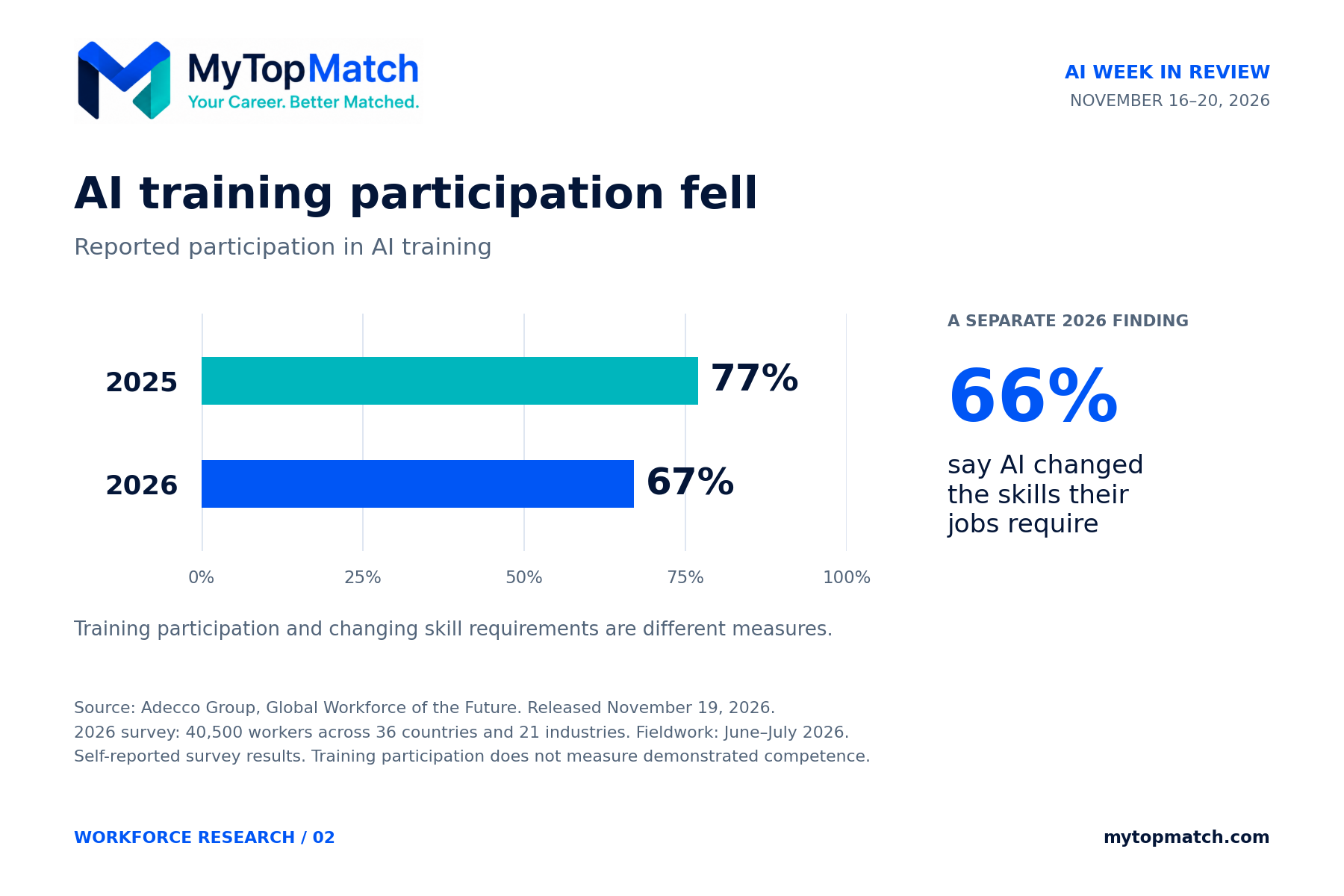
Adecco reports lower participation in AI training alongside changing job requirements. The 66 percent finding measures skill changes and is displayed separately.
For employers: Explain how the role is changing, provide relevant practice, and evaluate the result. Training should help someone perform a real assignment with appropriate review. Employees need a clear understanding of what successful use looks like in their own work.
Assess AI capability person by person
A November 19 Seramount announcement offered a useful challenge to assumptions about younger workers. In its survey, 18% of Gen Z respondents wanted to strengthen their AI skills, compared with 36% of millennials, 46% of Gen X, and 43% of boomers. Seramount [9]
The study was fielded in June through NORC's AmeriSpeak panel and covered more than 1,800 U.S. white-collar employees at organizations with at least 500 workers. It measures reported experiences and attitudes within that population. Interest in learning is not a test of competence, and these percentages cannot establish an individual's capability. Seramount [9]
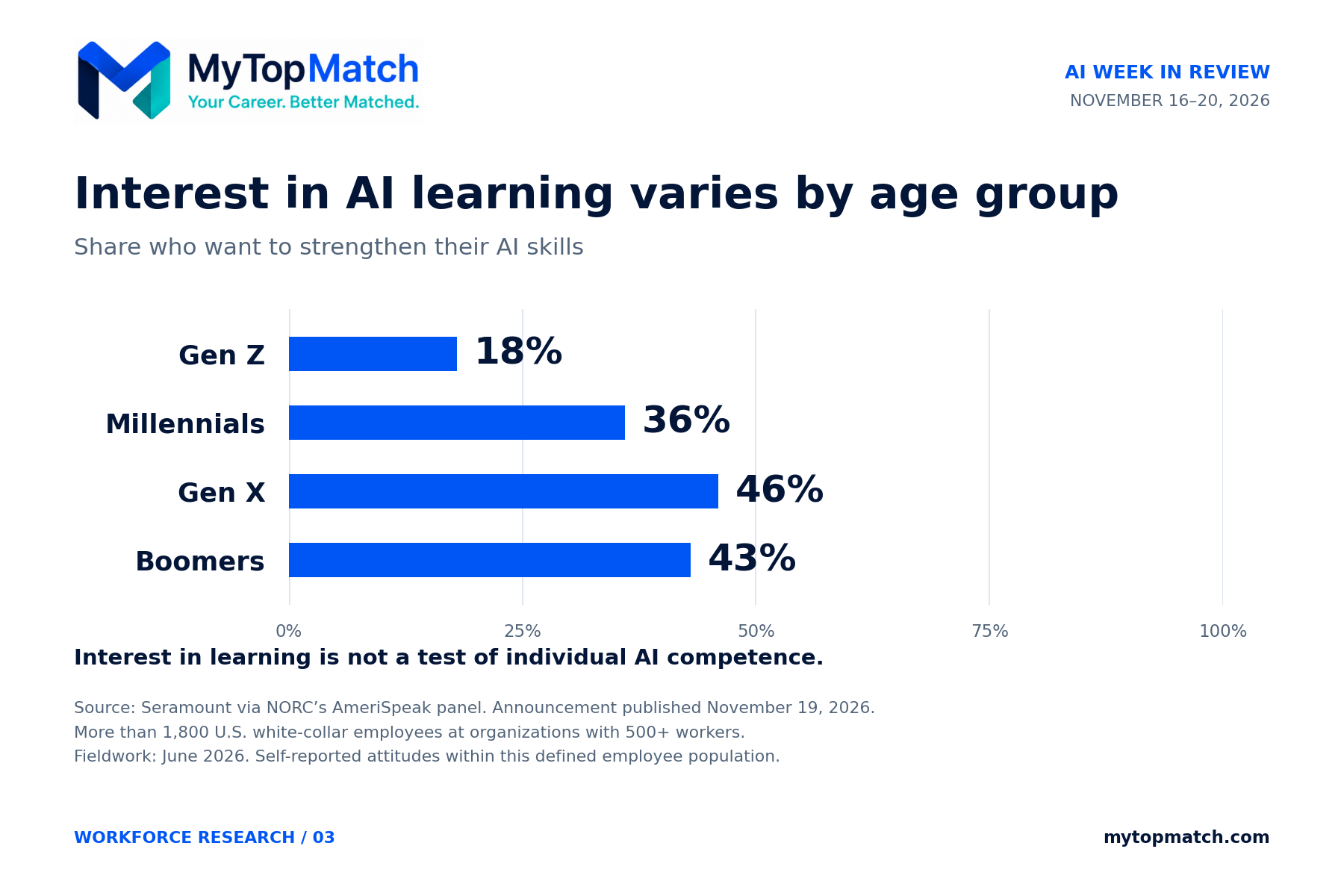
Seramount’s defined employee sample reported different levels of interest in AI learning. Assess individual capability directly.
For hiring managers: Assess the person. Ask candidates to explain an appropriate use, an error they caught, or a task they would keep under human control. Apply the same relevant standard across ages. Experienced professionals should present their own learning and results directly; early-career candidates should have a fair opportunity to demonstrate theirs.
AI investment reaches well beyond model development
NVIDIA reported third-quarter fiscal 2027 revenue of $115.8 billion on November 17, up 103% from a year earlier. Data Center revenue reached $107.6 billion. The figures cover the quarter ended October 25; they are financial results announced this week. NVIDIA [10]
On November 20, Anthropic announced the closing of its initial public offering. The company reported approximately $93.5 billion in aggregate gross IPO proceeds, including shares sold by existing stockholders, with approximately $91.6 billion received by Anthropic before underwriting and other offering expenses. Its shares began trading on November 19. Anthropic [11]
These developments show the scale of revenue and financing surrounding major AI businesses. They do not tell a job seeker how many suitable positions are currently open or whether a particular employer is expanding a specific team.
For your career: Look across the businesses needed to deliver and support the technology. Infrastructure operations, procurement, finance, customer implementation, manufacturing, and project delivery are reasonable areas to investigate when they fit your experience. Verify current vacancies, required qualifications, and employer conditions before treating an industry headline as a personal opportunity.
How to turn this week into a stronger career position
The following recommendations are MyTopMatch's practical interpretation of the week's developments. They are steps for building evidence about your own work, rather than forecasts about what every employer will demand.
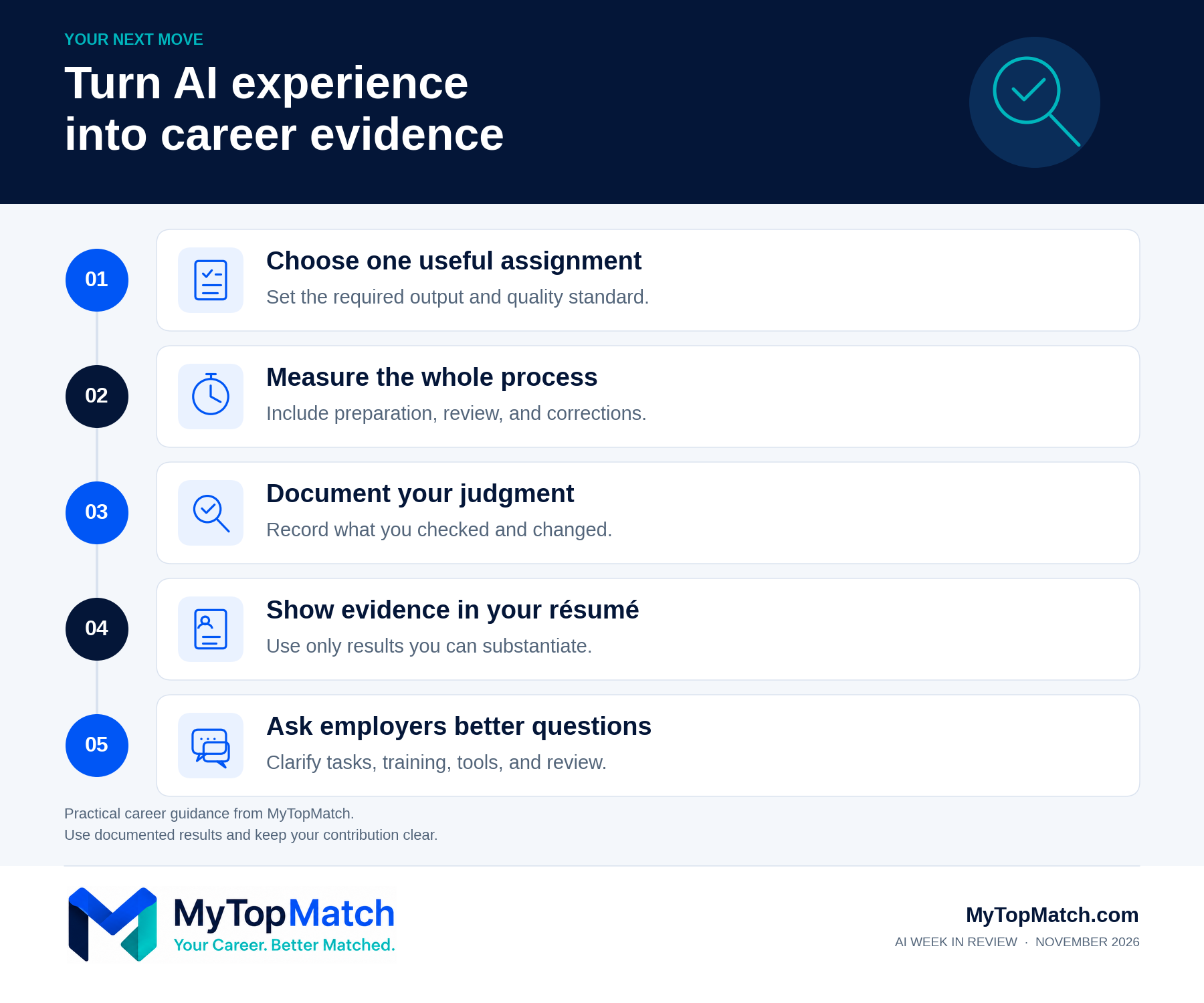
Five practical ways to build and communicate evidence of responsible AI use in your work.
Choose one assignment that matters
Begin with an assignment you understand well enough to evaluate. Possibilities include preparing a meeting brief, organizing public information, checking a document for missing requirements, or producing an initial analysis from data you are authorized to use.
Write down the intended result before trying a tool. Identify the source material, the acceptable level of accuracy, the expected format, and the decisions you will retain. A task becomes much easier to evaluate when success has a concrete definition.
Use a free option or an employer-approved tool already available to you for an initial exercise, where permitted. Keep the scope small. There is no reason to assume that buying another subscription will solve an undefined problem.
Measure the complete effort
Include preparation, prompting, checking, corrections, and final formatting in your comparison. Record whether the result met the same standard as your usual work. An output that appears quickly can still require substantial repair.
For illustration only, suppose a report normally takes 90 minutes. An AI-assisted attempt uses 20 minutes for preparation, 10 minutes for generation, and 35 minutes for checking and corrections. The total is 65 minutes, a 25-minute reduction for that attempt. Those numbers are a hypothetical example, not a MyTopMatch customer result or a claim about a particular product.
A single attempt is preliminary evidence. Repeat the process enough to understand whether the improvement holds across the normal variations in the assignment. If it fails, identify the cause before expanding the effort or spending money on another approach.
Keep a record of your judgment
Save a concise account of the assignment and your contribution, using materials you have permission to retain. Include what you asked the system to do, which facts or calculations you checked, what you corrected, and why the finished result was acceptable.
This record can support an interview discussion without requiring you to share confidential employer information. Where necessary, create a separate demonstration using public or fictional data and label it as such.
An error you caught can be useful evidence. Explain how you recognized it and how you prevented it from reaching the final deliverable. That makes your role in the work visible.
Put defensible evidence into your résumé
The phrase “AI proficient” leaves too much unexplained. Describe the specific contribution you made in terms a hiring manager can evaluate.
For example, if accurate, a résumé could state: “Developed an AI-assisted reporting process and verified each summary against source records before management review.” If you measured a time reduction or quality improvement, add the documented result and an appropriate period or scope.
Avoid adding percentages merely because they make a bullet sound stronger. Keep your level of responsibility accurate, distinguish a personal exercise from an employer project, and be ready to explain the process in an interview. A clear account of a real contribution is useful even when no reliable percentage is available.
Ask employers how they evaluate AI use
A job description that mentions AI can cover very different expectations. Ask what the person in the role will actually do, what information they may use, and how the finished work is reviewed.
Useful interview questions include:
• Which recurring assignments in this role currently involve AI?
• How do you decide whether the result meets your standards?
• What training and approved tools are available to the team?
• How has AI changed the responsibilities of the person doing this job?
The answers can help you assess the position and explain your relevant experience. They also make the discussion more concrete than a general conversation about whether the organization is “AI driven.”
What employers should look for now
Employers can make AI capability easier to assess by using a relevant, bounded work sample with clear rules. Tell candidates whether AI is allowed, provide the same materials and conditions, and explain how their work will be evaluated.
For an analyst, the assignment might involve reviewing a small fictional dataset and identifying a decision the information supports. For an operations role, it might involve finding weaknesses in a sample procedure. The exercise should reflect the job and be small enough to assess fairly.
Evaluate accuracy, explanation, and judgment. Ask how the candidate checked a claim or handled missing information. A fluent answer should be examined with the same care as any other work product.
Current employees also need room to learn. Identify appropriate tasks, make expectations explicit, and review the effect on quality and workload. A rollout deserves adjustment when employees spend more time repairing outputs or when the process creates uncertainty about responsibility.
The objective is a dependable improvement in work that matters to the organization and the people doing it.
Put your experience to work
The week offers a practical reason to take stock of your own capabilities. Identify the work you understand deeply, the results you can substantiate, and one useful area in which you can build AI experience. That gives you a grounded starting point for a résumé update, an interview, or a conversation about your current role.
MyTopMatch brings your experience, goals, and preferences together in a Professional Passport and offers job recommendations with explanations of the fit. Its free membership includes core matching and career guidance, and the site offers free career resources for people exploring their next step. Membership is free to start, with no credit card required; optional paid services have separate terms. MyTopMatch [12]
Explore MyTopMatch [12] or begin with the free career tools and templates [13]. Build a clear picture of what you offer, then use it to pursue work that fits.
Editorial note: Reporting is current through November 20, 2026. Product performance has not been independently tested for this article. Survey findings are self-reported, and the studies use different populations and definitions. Career recommendations are editorial analysis.