
Watch the complete ten-episode series (5 minutes 25 seconds): https://static.metricool.com/planner/202611/6783961-file-7488546092275080762.mp4
MyTopMatch in Practice brings ten common career questions into a series of short walkthroughs. Start with the problem you have today, try the relevant tool, and review the result against your own evidence. The examples are fictional or explicitly labeled public illustrations.
1. Turn a responsibility into an accomplishment
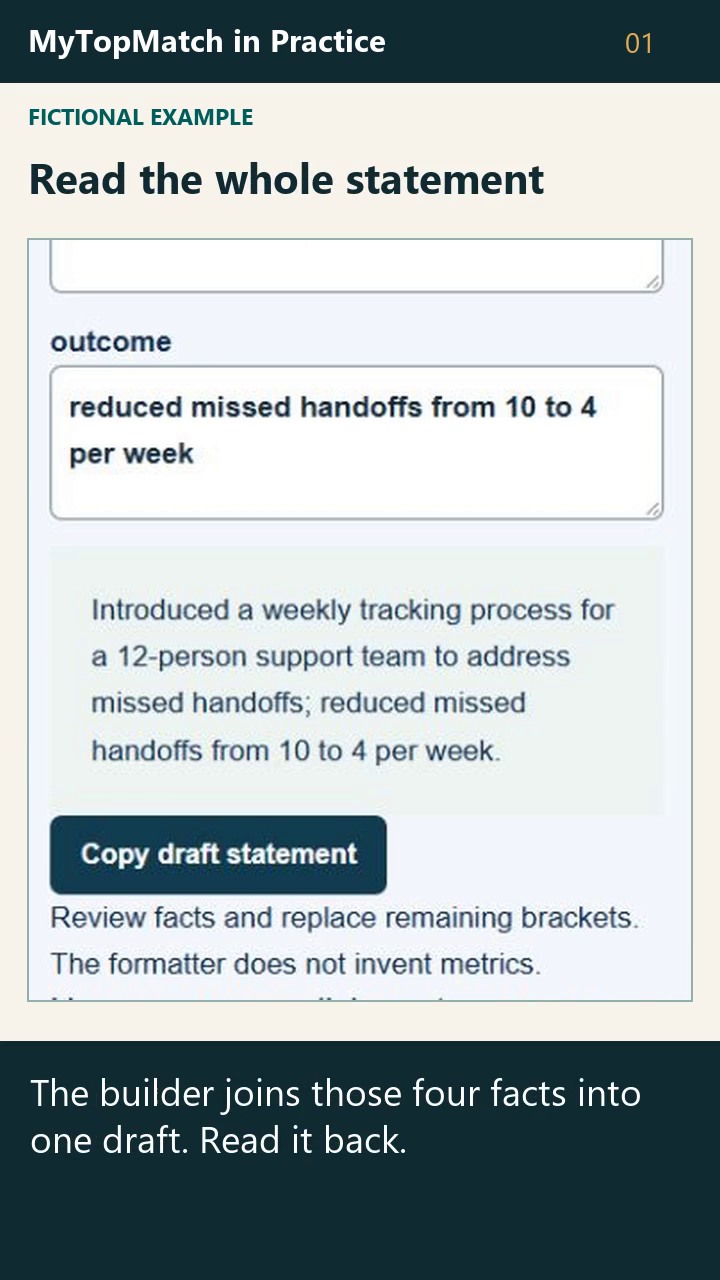
The Resume Accomplishment Builder takes four inputs: action, scope, problem and outcome. In our fictional example, someone introduced a weekly tracking process for a 12-person support team to address missed handoffs. The stated outcome was a reduction from ten to four missed handoffs per week.
The builder combines those inputs into a draft statement. Before using a metric, check who counted it, the time period and whether the comparison is fair. An outcome described accurately in words can also be useful.
Try the public tool: https://mytopmatch.com/free-career-tools/resume-accomplishment-builder
2. Bring Link one focused career question
Link’s public example asks why an operations role might fit a sample professional. Team coordination and process improvement support the connection. Budget ownership remains an open question because the sample profile supplies no evidence of it.
Use that distinction in your own career conversation. Bring the facts you have, ask which evidence would clarify the decision, and choose one useful next action. Link is available through a free member account. Private AI guidance and saved memory are separate choices, and you control what you confirm.
Explore Link: https://mytopmatch.com/career-agent
3. Choose an optional starting point
The career pathways experience lets you choose a current situation and a goal. A fictional career changer can choose Understand career position and review the suggested next step before continuing.
You can edit the choice or view the full service catalog. The review shows access terms. An eligible adult confirms the age requirement before continuing into the destination.
Choose a starting point: https://mytopmatch.com/career-pathways
4. Organize the evidence behind your experience
The Professional Passport’s public sample separates skills, achievements, career goals, work preferences, qualifications and dealbreakers. An achievement becomes more useful when its action, scope and result can be checked.
With a free member account, review the facts you add, confirm the wording and revisit the private record. Keep confidential employer information out of anything you intend to share.
Explore the Professional Passport: https://mytopmatch.com/professional-passport
5. Read the explanation behind a match
The Job Matching page includes a prominently labeled synthetic sample with a 93% illustrative match. Its Reasons tab connects the sample’s leadership scope and talent strategy to the example role.
The Unknowns tab keeps reporting line, travel expectations and the exact hybrid schedule visible as questions. Use reasons, concerns, unknowns and tradeoffs to decide what to investigate. A fit percentage is an explanation of that comparison and carries no hiring probability.
Explore the matching illustration: https://mytopmatch.com/job-matching
6. Explore an included assessment mini report
A free authenticated member account includes all ten Professional Intelligence assessments and their personalized mini reports. The AI Work Intelligence preview describes answer patterns, strengths and a practical next step.
Choose one assessment for the career question you want to explore. Read the limitations alongside the result. Full reports are optional and have separate pricing. The public walkthrough shows the selection and included-report description.
Explore the assessments: https://mytopmatch.com/assessments
7. Prepare one interview story you can support
The free Interview Preparation Planner includes a fictional Cedar Works example. During a facilities move, Alex kept a dependency register and asked task owners to confirm deadlines. Unresolved tasks became visible during weekly reviews.
The example supplies no measured improvement. Practice explaining the action and the observed result in words, then prepare one question about the work you would be doing. The planner includes an evidence bank, questions, logistics and a post-interview review.
Use the public planner: https://mytopmatch.com/free-career-tools/interview-preparation-planner
8. Look beyond the headline salary
Our fictional technical program manager offer includes a $90,000 annual base, a $9,000 target bonus and a $5,000 signing bonus. The Free Offer Check displays $104,000 in estimated first-year cash and marks equity unknown.
Ask which payments are guaranteed, conditional or discretionary. Review missing duties, benefits, workload and other written terms. The complete $49.95 analysis is an optional next step.
Try the Free Offer Check: https://mytopmatch.com/offer-analyzer
9. Find a free tool for one career problem
The free tools directory includes public worksheets, calculators, assessments and member starting points. Search for a task such as accomplishment, then read the access details on the relevant entry.
Public access, free membership, limited allowances and optional paid depth each have their own terms. The directory includes overlapping collections and individual entries. Choose one useful result rather than treating the listing count as a count of independent methods.
Browse the directory: https://mytopmatch.com/free-career-tools
10. Keep a result and choose its next use
After drafting an accomplishment, you can opt into temporary recovery in the same browser tab. Reloading can restore those fields. Turning the option off removes the saved tab copy.
You can download your current draft as text and explore Passport or Link. Review and confirm any facts you choose to add to your private record. The temporary browser copy and account evidence each have their own controls.
Return to the builder: https://mytopmatch.com/free-career-tools/resume-accomplishment-builder
The series uses actual public MyTopMatch screens, clearly labeled examples and locally generated narration. Use the walkthrough that answers your immediate question, check your own facts, and decide on one next action.